ATS-Friendly Resume Creation Guide for Freshers Using Overleaf and ChatGPT
1. Introduction
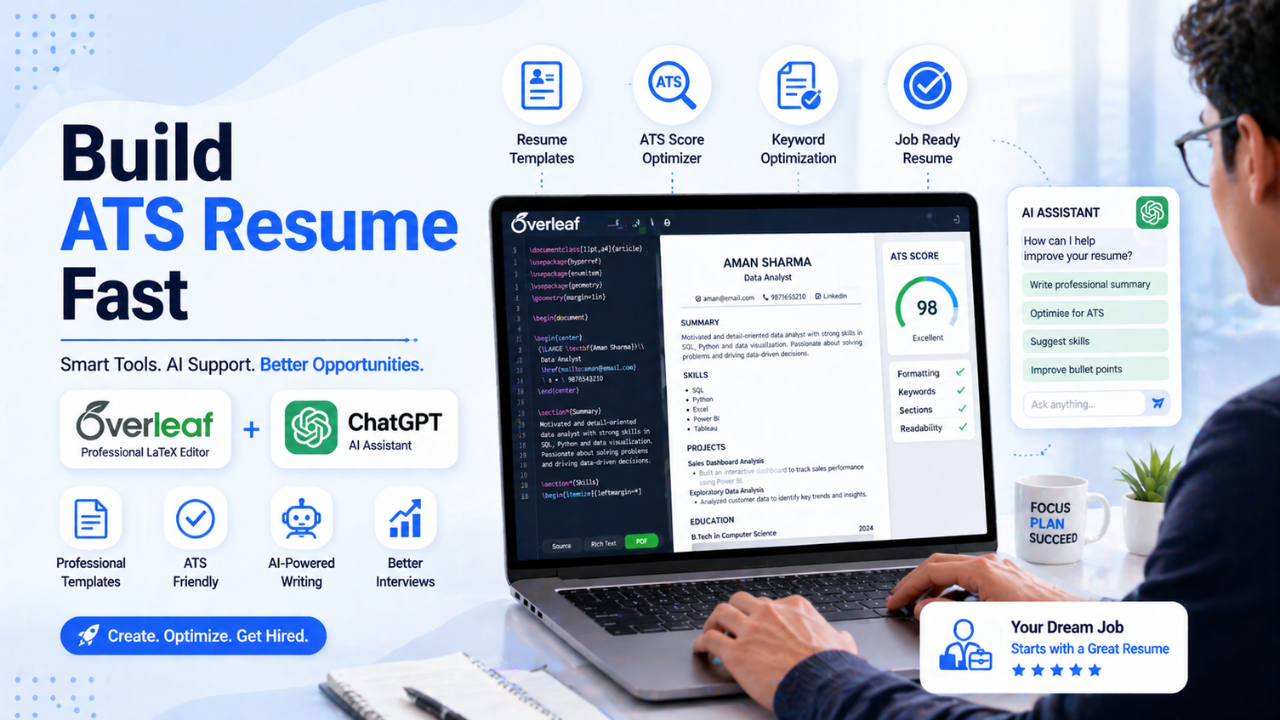
This guide helps fresh graduates create a professional ATS-friendly resume using Overleaf (LaTeX) and ChatGPT. In 2026, simply having a degree is not enough to get interview calls. Recruiters first evaluate your resume before they decide whether to contact you.
Many companies today use Applicant Tracking Systems (ATS) to filter resumes before a recruiter reviews them manually. If your resume is not ATS-friendly, it may never reach the recruiter, even if you have strong skills and good academic performance.
This is why resume structure matters.
Using an Overleaf resume template ensures:
- Clean formatting
- Professional layout
- ATS readability
- Easy editing
- No alignment issues
With the help of this guide, freshers can:
- Create a resume in Overleaf
- Generate strong resume content using ChatGPT
- Customize resume sections easily
- Build a one-page professional resume for job applications
This guide is especially useful for students applying for software jobs, internships, IT support roles, data roles, and entry-level fresher positions in companies like Accenture, TCS, Infosys, Wipro, Cognizant, Capgemini, Deloitte, and startups.
Also Read: Accenture interview experience for freshers 2026
Top AI Skills Students Must Learn Before Graduation in 2026
2. What is an ATS-Friendly Resume
ATS (Applicant Tracking System) is software used by companies to scan resumes automatically before a recruiter checks them. It helps companies save time by filtering candidates based on keywords, education, experience, and required skills.
ATS checks for:
- Skills
- Keywords
- Education
- Experience
- Resume structure
If your resume contains tables, graphics, images, fancy fonts, or poor formatting, the ATS may fail to read your resume correctly.
ATS Resume Rules
- Use simple headings
- Use standard fonts
- Avoid tables and graphics
- Use bullet points instead of long paragraphs
- Keep resume 1 page for freshers
Recommended Fonts
Use simple fonts that ATS can read easily:
- Times New Roman
- Arial
- Calibri
Recruiters spend only a few seconds on each resume, so readability and clarity are more important than fancy design.
3. Why Use Overleaf for Resume
Overleaf is an online LaTeX editor used to create structured and professional resumes. Many students use Microsoft Word, but formatting problems like broken alignment, inconsistent spacing, and design issues are very common.
Overleaf solves these problems by creating a clean and professional layout automatically.
Benefits of Using Overleaf
- Clean and professional formatting
- No alignment issues
- Easy editing
- ATS-friendly structure
- Free and cloud based
- Easy PDF generation
For freshers, this creates a strong first impression. A clean resume looks more professional and improves recruiter trust.
Website:
https://www.overleaf.com
4. Steps to Create Resume in Overleaf
Step 1 – Open Overleaf
Go to:
Step 2 – Create Account
Sign up using:
- Google account
- Email address
Step 3 – Create New Project
Click:
New Project → Blank Project
Step 4 – Replace Default Code
Delete the existing code and paste the resume template code provided in this guide.
Step 5 – Edit Resume Details
Update the following sections:
- Name
- Phone number
- Location
- Skills
- Education
- Projects
- Certifications
After editing, click Recompile to generate the updated resume PDF.
5. Important Resume Sections for Freshers
A good fresher resume should include the following sections.
Header
Include:
- Full Name
- Phone Number
- Location
Example:
John Doe
Hyderabad, India | 9876543210 | johndoe@email.com
Avoid including:
- Father’s name
- Religion
- Full residential address
Professional Summary / Career Objective
This is a short paragraph describing:
- Your qualification
- Your key skills
- Your career interest
Example prompt for ChatGPT:
Write an ATS-friendly professional summary for a B.Tech graduate skilled in Python, SQL, HTML and cloud basics applying for software engineer roles.
Example Summary:
Motivated B.Tech graduate with strong skills in Python, SQL, HTML, and cloud basics. Passionate about software development and problem-solving with hands-on experience in academic projects and technical learning. Looking for an opportunity to contribute technical skills and grow in a professional software development environment.
Technical Skills
Example format:
Programming Languages: Python, Java, C++
Web Technologies: HTML, CSS, JavaScript
Database: SQL, MySQL
Tools: Git, VS Code
Cloud: AWS Basics
Education
Include:
- Degree
- College Name
- Year
- CGPA
Example:
B.Tech – Computer Science
XYZ Engineering College
2020 – 2024
CGPA: 8.2
Projects
Projects are important for freshers because they prove practical knowledge.
Include:
- Project title
- Technologies used
- Key work done
Example:
Student Management System
- Developed using Python and MySQL
- Implemented CRUD operations
- Built simple interface for managing student data
Internships / Experience
If you completed internship or work experience include:
- Company name
- Role
- Duration
Example:
Software Development Intern
ABC Technologies
Jan 2024 – Mar 2024
Responsibilities:
- Assisted in developing frontend components
- Fixed bugs and tested modules
- Learned Git version control
Certifications
Examples:
- AWS Cloud Practitioner
- Python Programming – Coursera
- Cloud Computing – NPTEL
Strengths
Examples:
- Quick learner
- Problem solving ability
- Team collaboration
- Adaptability
Complete Interview Guide for Freshers 2026
6. Using ChatGPT to Improve Resume Content
Freshers can use ChatGPT to generate better resume content quickly and professionally. You can also paste your old resume into ChatGPT and ask it to improve sections.
Example prompts:
Professional Summary Prompt
Write an ATS-friendly professional summary for a fresher applying for software developer roles with skills in Python, SQL and HTML.
Skills Prompt
Organize my technical skills for an ATS resume: Python, SQL, HTML, CSS, AWS basics.
Project Prompt
Convert my project description into strong resume bullet points.
This helps in creating clear, professional, and recruiter-friendly resume content quickly.
7. Overleaf Resume Template Code
Freshers can copy the following code and paste it in:
Overleaf → Blank Project → main.tex
The template code structure includes:
- \documentclass
- \usepackage settings
- Professional Summary section
- Technical Skills section
- Education section
- Projects section
- Internships section
- Certifications section
- Strengths section
This creates a professional ATS-friendly one-page resume layout.
8. Common Mistakes While Editing Resume in Overleaf
Font Issues
Most ATS resumes use Times New Roman.
In LaTeX use:
\usepackage{times}
Font Size
Recommended setting:
\documentclass[11pt,a4paper]{article}
Missing Backslashes
Correct:
\section*{Skills}
Wrong:
section*{Skills}
Missing Brackets
Correct:
\textbf{Technical Skills}
Wrong:
\textbf Technical Skills
Removing Important Lines
Do not remove:
\begin{document}
or
\end{document}
These are required for proper PDF generation.
9. Resume Tips for Freshers
- Keep resume 1 page
- Use bullet points
- Add skills based on job description
- Highlight projects and internships
- Always download resume as PDF
Recruiters prefer clarity over decoration.
10. Final Checklist
Before applying for jobs:
- Correct phone number
- Correct email
- Updated skills
- Correct project descriptions
- Resume exported as PDF
This final review helps avoid unnecessary rejection.
11. Conclusion
Creating a strong resume is the first step toward getting interview opportunities.
Using Overleaf and ChatGPT together, freshers can easily create professional ATS-friendly resumes suitable for modern hiring systems.
Keep your resume:
- Clear
- Concise
- Relevant to the job role
Your resume is your first impression before the interview begins. A strong ATS-friendly resume can open the door to internships, fresher jobs, and better career opportunities.
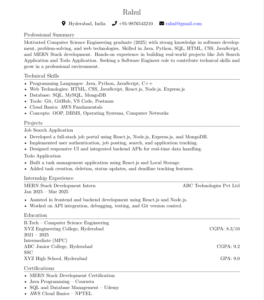
Sample resume – Overleaf code
\documentclass[11pt,a4paper]{article}

\usepackage[a4paper,margin=0.8in]{geometry}
\usepackage{titlesec}
\usepackage{enumitem}
\usepackage{hyperref}
\usepackage{fontawesome5}
\usepackage{times}

\hypersetup{
colorlinks=true,
urlcolor=black
}

\setlength{\parindent}{0pt}
\setlist[itemize]{noitemsep, topsep=2pt, leftmargin=*}

\titleformat{\section}
{\large\bfseries}
{}{0em}{}[\titlerule]

\titlespacing*{\section}{0pt}{6pt}{4pt}

\begin{document}

\begin{center}
{\LARGE \textbf{Rahul}}\\
Hyderabad, India | +91-9876543210 | rahul@gmail.com \\
\href{https://www.linkedin.com/in/yourprofile}{LinkedIn} |
\href{https://github.com/yourgithub}{GitHub}
\end{center}

%---------------------------
\section*{Professional Summary}

Motivated Computer Science Engineering graduate (2025) with strong knowledge in software development, problem-solving, and web technologies. Skilled in Java, Python, SQL, HTML, CSS, JavaScript, and MERN Stack development. Hands-on experience in building real-world projects like Job Search Application and Todo Application. Passionate about learning new technologies and seeking an opportunity as a Software Engineer to contribute technical skills and grow in a professional environment.

%---------------------------
\section*{Technical Skills}

\textbf{Programming Languages:} Java, Python, JavaScript, C++ \\

\textbf{Web Technologies:} HTML, CSS, JavaScript, React.js, Node.js, Express.js \\

\textbf{Database:} SQL, MySQL, MongoDB \\

\textbf{Tools:} Git, GitHub, VS Code, Postman \\

\textbf{Cloud Basics:} AWS Fundamentals \\

\textbf{Concepts:} OOP, DBMS, Operating Systems, Computer Networks

%---------------------------
\section*{Education}

\textbf{B.Tech – Computer Science Engineering} \\
XYZ Engineering College, Hyderabad \\
2021 – 2025 \\
CGPA: 8.3/10

%---------------------------
\section*{Projects}

\textbf{Job Search Application} \\
\begin{itemize}
    \item Developed a full-stack job portal application using React.js, Node.js, Express.js, and MongoDB.
    \item Implemented user authentication, job posting, job search, and application tracking features.
    \item Designed responsive frontend UI and connected backend APIs for real-time data handling.
\end{itemize}

\textbf{Todo Application} \\
\begin{itemize}
    \item Built a task management application using React.js and Local Storage for daily productivity management.
    \item Added features like task creation, deletion, status updates, and deadline tracking.
    \item Improved user experience with clean UI and simple task organization workflow.
\end{itemize}

%---------------------------
\section*{Internship Experience}

\textbf{MERN Stack Development Intern} \\
ABC Technologies Pvt Ltd \\
Jan 2025 – Mar 2025

\begin{itemize}
    \item Assisted in frontend and backend development using React.js and Node.js.
    \item Worked on API integration, debugging, and testing modules.
    \item Collaborated with team members using Git and GitHub for version control.
\end{itemize}

%---------------------------
\section*{Certifications}

\begin{itemize}
    \item MERN Stack Development Certification
    \item Java Programming – Coursera
    \item SQL and Database Management – Udemy
    \item AWS Cloud Basics – NPTEL
\end{itemize}

%---------------------------
\section*{Achievements}

\begin{itemize}
    \item Successfully completed multiple full-stack development projects.
    \item Participated in college-level coding competitions and technical workshops.
    \item Built GitHub portfolio showcasing practical software development projects.
\end{itemize}

%---------------------------
\section*{Strengths}

Quick learner, Problem-solving ability, Team collaboration, Adaptability, Communication Skills

%---------------------------
\section*{Career Objective}

To secure a Software Engineer role where I can apply my technical knowledge, contribute to real-world projects, and continuously improve my development skills while growing professionally in a challenging environment.

\end{document}